
Part of Vivaldi Studio · the intonation bench

Vivaldi Keyboard

An 88-key piano with twenty-two historical temperaments and twenty-one transposing instruments. Hear what your alto sax actually plays. Tune your harpsichord in 1/4-comma meantone. Compare Equal Temperament against Pythagorean, in cents, in real time.

Touch the screen, plug in a Bluetooth keyboard, hit Space for Sustain on Mac. Made for musicians, theory teachers, tuners, and historical-tuning nerds. We dare you to find this elsewhere.

Vivaldi Keyboard — control wheels and 88-key pianoVivaldi Keyboard — control wheels and 88-key piano 2

What it does

More than a keyboard: an 88-key instrument built around real tuning and transposition. Historical temperaments, transposing instruments, concert pitch, your own SoundFonts — here's what's inside.

22 Temperaments

Equal, Just Intonation, Meantone, Well Temperaments, Historical reconstructions, Pythagorean, World scales. Switch with a turn of the wheel.

21 Transposing Instruments

Saxes, clarinets, brass, strings, woodwinds — verified MIDI ranges and correct octave transposition. The keyboard dims keys outside your instrument's range.

Concert Pitch, for real

Play a written C on Alto Sax, hear the actual E♭ concert at the temperament's exact frequency. No mental math, no approximation.

Cent Deviations Panel

See the exact offset of every note from Equal Temperament. Open the ¢ tab and watch the math.

Variable Reference Note

For non-equal temperaments, choose which key is pure. Shift the wolf, find the sweet spots.

SoundFont + Bank Selection

Import any .sf2 from Files or iCloud. The app parses every preset inside — melodic banks, drum kits, dozens of instruments — and lets you pick from a scrollable preset list. Swap presets live while you play.

Physical Keyboard

Plug in a Bluetooth keyboard on iPad, or use the Mac keyboard directly. S D F G H J K L for white notes, E R Y U I for black notes. Shift octave live with [ and ]. Full C0–C8 range.

Three configurable pedals

Sustain, Sostenuto, Soft — turn on the ones you use, switch off the rest in settings. Touch or drag on iPad, or Space / X / C on Mac. The Soft pedal affects only the notes played while it is held, exactly like a real piano.

Stable During Interruptions

Siri, an incoming call, a system alert — the audio engine pauses cleanly and resumes when the interruption ends. No more silent app after a phone call.

All 22 Temperaments

Seven categories. Each comes with a description in the in-app guide — what it sounds like, where it came from, why it matters.

Regular

Equal (12-TET)

Just Intonation

5-limit7-limit

Meantone

1/4 comma1/3 comma1/5 comma1/6 comma2/7 comma

Well Temperament

Werckmeister IIIKirnberger IIIVallottiYoungNeidhardtBarnes

Historical

Bach / LehmanRameauKellner

Pythagorean

Pythagorean

World / Extended

19-TET31-TET53-TETArabic 24-TET

Transposing Instruments

Twenty-one instruments with verified MIDI ranges and correct octave transposition. Pick your instrument from the wheel and the keyboard reshapes itself: keys outside the playable range dim out, frequencies shift to match your concert pitch.

Play a written C on alto sax → you hear the actual concert E♭, at the exact frequency of the selected temperament. No conversion in your head. Ever.

Woodwinds Piccolo, Flute, Oboe, Clarinet E♭, Clarinet B♭, Bassoon
Saxes Soprano B♭, Alto E♭, Tenor B♭, Baritone E♭
Brass Trumpet B♭, Trumpet C, Horn in F, Trombone, Tuba, Flugelhorn B♭
Strings Violin, Viola, Cello, Double Bass

Twenty-one transposing instruments plus Concert pitch. Real ranges, real transposition.

Sounds

Five built-in instruments from a bundled 142 MB FluidR3 GM SoundFont, plus any .sf2 you import. Multi-touch polyphony on iPad, click-to-play on Mac.

Piano

Acoustic grand — warm, full-bodied, the default starting point.

Organ

Church organ — deep, sustained; pairs well with well-temperaments.

Flute

GM flute — clean, single-voice; perfect for hearing temperament differences.

Strings

String ensemble — sustained legato, great for hearing beating intervals.

Harpsichord

Percussive attack, brittle overtones; made for historical temperaments.

Need more? The SoundFont + Bank Selection pillar above covers custom .sf2 imports with live preset switching.

Reference Frequency

Configurable from 415 Hz (baroque pitch) to 466 Hz (high orchestral). Default is the modern A = 440 Hz.

Frequency updates instantly while you play. Pair it with a meantone temperament and suddenly you're rehearsing on a real harpsichord — without owning one.

A4 range
415 Hz 440 Hz 466 Hz
Pro tip

Real-time frequency monitor

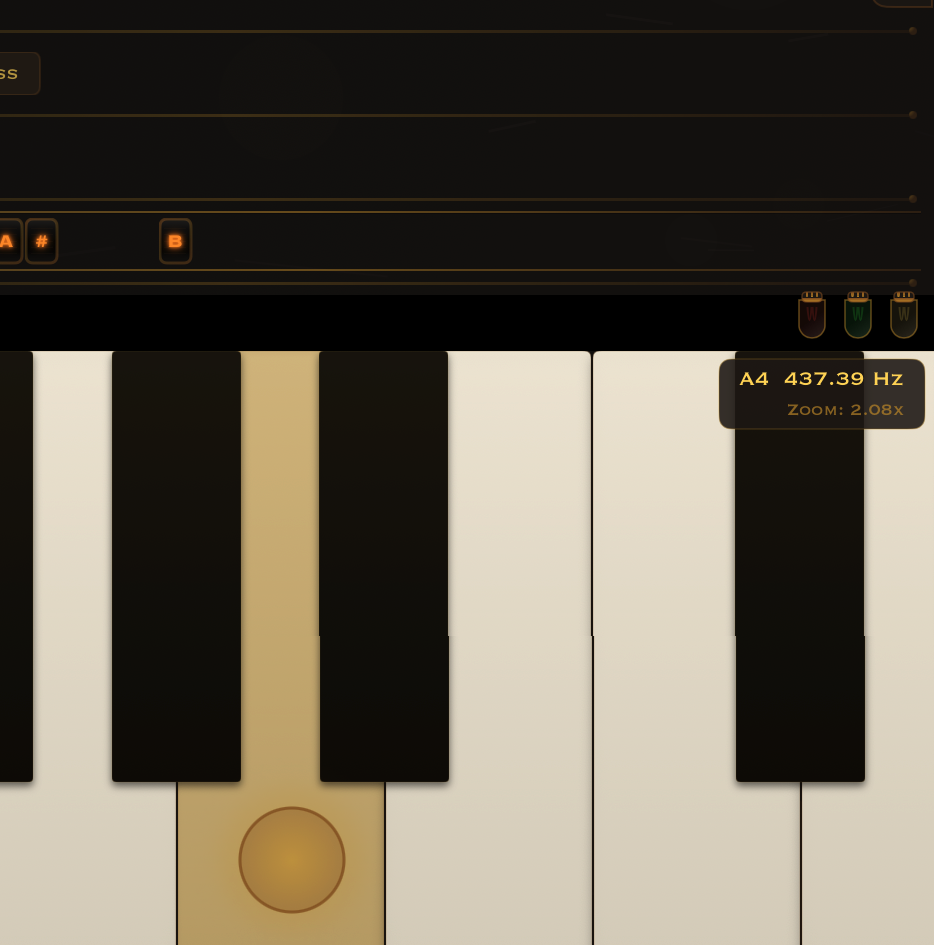
Switch it on from Settings → Debug → Show frequency overlay and a small panel appears in the top-right corner. It shows the exact frequency in Hertz of the last note you played, plus the current zoom of the keyboard.

Useful to verify that A4 is 437.39 Hz in 1/4-comma meantone with Root = C, 440.00 Hz in equal temperament, or whatever the active combination produces. The number updates live as you play.

Frequency overlay showing A4 at 437.39 Hz with 2.08x zoom

A4 in 1/4 comma meantone, Root = C

How it works

Three wheels above, an 88-key piano below, a reference-pitch slider alongside. That's the whole interface.

1

Transpose & instrument

Turn the Transpose wheel, then pick your exact instrument from the rail that appears.

2

See your range

Keys outside the instrument's playable range dim out. You still see them, but you know.

3

Temperament

Choose a category on the Temperament wheel. For non-equal tunings, a Root Note rail appears to pick which key is pure.

4

Sound

Piano, organ, flute, strings, harpsichord — or any .sf2 with live preset switching.

5

Play

88 keys. Multi-touch on iPad, click on Mac. Hold the left-edge circle: one finger drags to scroll, two fingers drag up or down to zoom.

Frequency calculation

MIDI note touched
+ concertPitchOffset (from selected instrument)
= concert MIDI note

baseFreq = referenceFreq × 2^((midiConcert − 69) / 12)
+ cent offset from temperament
= final frequency

Two gestures, one circle

A single hold circle on the left edge. One finger drags to scroll the 88 keys. Two fingers drag vertically to zoom in and out. No menus, no toolbars.

Hold the left-edge circle, one finger drags to scroll.
Hold the left-edge circle, two fingers drag up or down to zoom.

Landscape only.

Beyond touch — Bluetooth keyboard & pedals

Multi-touch on the screen is great. Plugging in a real keyboard is greater. On Mac, the keyboard is the instrument.

Physical keyboard mapping

Pair any Bluetooth keyboard to your iPad, or use the Mac keyboard directly. The QWERTY row plays one full octave; the row above it gives you the black keys.

White notes S D F G H J K L C4–C5
Black notes E R   Y U I C# D# F# G# A#
Shift octave [   ] live, full C0–C8 range

Choose the starting octave in Settings → Physical keyboard.

Three pedals, real piano behaviour

Touch and drag on iPad — drag forward to lock on or off with one natural gesture. On Mac the keyboard shortcuts cover everything.

Sustain Space ⌥+Space to lock
Sostenuto X ⌥+X to lock
Soft C ⌥+C to lock

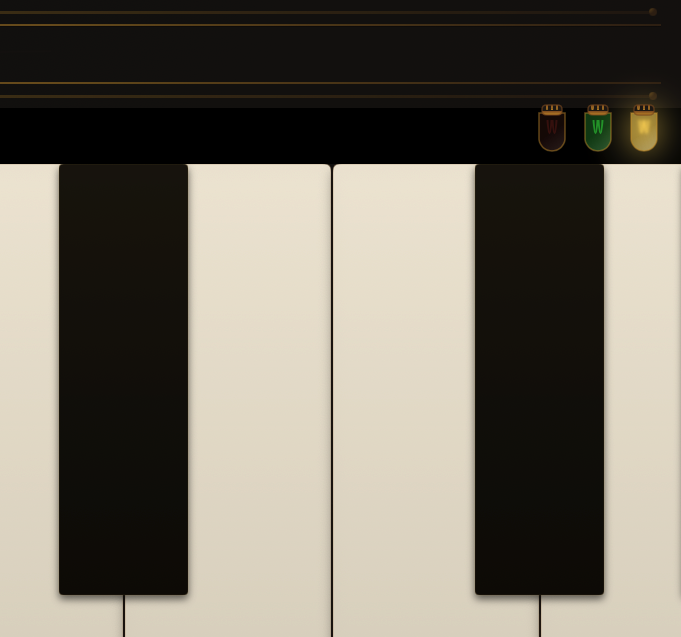
Visual feedback — three small lamps on the right rail show the live state of each pedal:

The three pedal indicator lamps on the right rail
  • Off — pedal released
  • Dim — pedal held momentarily (finger on, or shortcut pressed)
  • Bright + pulsing glow — pedal locked on (drag forward, or ⌥+shortcut)

The Soft pedal affects only the notes you play while it is engaged. Notes already ringing (held by Sustain or Sostenuto) keep their original volume — exactly like a real piano.

Tutorials

Three short walk-throughs — the temperament in action, the SoundFont import, and the pedals.

Tutorial 1

Hear the temperament

An E major triad in 1/4-comma meantone — pure, beatless thirds. Watch the frequency tip in the top-right corner.

  1. Turn the Temperament wheel to 1/4 comma meantone.
  2. Play an E major triad (E – G♯ – B).
  3. Look at the frequency tip in the top-right corner.
  4. Same chord, but every note shifted — the way Bach would have heard it.

Tutorial 2

Bring your own sound

Switch from a built-in preset to a custom .sf2 — same keys, different instrument.

  1. Open the Sound wheel and tap Custom.
  2. Browse the bundled library, or import any .sf2 from Files.
  3. Pick a bank and program inside the file.
  4. Hit Done — the keyboard switches sound in real time.
  5. Play. Same keys, completely different instrument.

Tutorial 3

Master the pedals

A walk-through of the three pedals and the Mac shortcuts.

  1. Tap-and-hold Sustain, then release — notes ring out, then stop.
  2. Drag forward to lock the pedal on.
  3. On Mac: Space for Sustain, ⌥+Space to lock.
  4. Same idea for Sostenuto (X) and Soft (C).
  5. Hold Sustain, change Soft mid-chord — the held notes keep ringing at full volume.

One purchase. iPad and Mac.

Universal Purchase: buy once, play on iPad and Mac. No subscription, no telemetry, no account.

€1.99 — on the App Store.

Currently shipping: release 1.29.20.05 (v2)